
iBookshelf2.14.5 - App Store
You'll be able to see results in few seconds.
Publisher Description
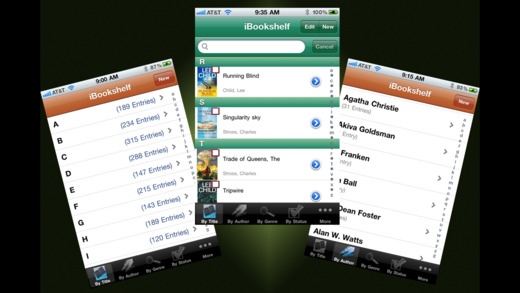
The top ranked book database in the app store!! Books Category Top Paid 20 in 20 countries! Ranked in the iPad Books Category Top Paid 10 in 36 countries! iBookshelf is your personal portable library reference. A comprehensive book database, created and continuously maintained through extensive feedback from readers like you. Follow iBookshelf on Twitter to keep updated with new features and random thoughts from the developer.
Watch the demonstration video on YouTube! Search for iBookshelf.
iBookshelf is NOT an eReader. You do not load actual books into this app. Instead, iBookshelf is designed to help you keep track of your personal book collection, whether your books are physical or digital copies.
Books are displayed sorted by your preference. You can search for books in your library, and enter a "loan status" to remember who you loaned the book to or borrowed it from. A new book can be entered automatically (enter ISBN and remaining data is loaded from the internet) or manually. It will even tell you where you can buy the book and how much it costs and where you can find a library with the book!
__________________________
** Previously ranked #5 Paid App in the Books category in the US App store **
** Listed in "The Nine Best iPhone Apps For Readers" - Associated Content **
** Listed on CollegeDegrees.com as #1 in the 10 best iPad apps for students! **
"This application developed by Josh Pressnell is a must have for any book lover."
** 3.5 Mice in MacWorld **
__________________________
Features:
- Supports large databases. Tested with a database of over 8,000 records!
- Enter the ISBN to retrieve all available book data from the internet via 16 different data sources, including international sources! Even loads series information for most books!
- Scan barcodes directly into the app using the built-in and ready-to-use iOS or ZBar scanners! Can also use Pic2Shop as a separate app!
- Barcode scanning for older iPads! Requires Cue Cat USB scanner and the iPad USB Camera Kit. Search 'iPad Cue Cat' for details!
- Enter the title and/or author to look up the ISBN and load remaining data from the internet
- Easily enter several books at once after doing a title/author search. Just select all the books you want to load and tap "Save".
- Find libraries near you which have books in your database! Powered by agreement with OCLC WorldCat! Select "Find" from the book view to search for all nearby libraries that carry the book!
- Read eBooks via integration with QuickReader and MegaReader!
- Built-in web browser lets you view, sort, and print your book lists!
- Set customizable app behavior in the iPod settings app.
- Share your books on Facebook, Twitter, and via Email!
- Track book loans. Always know who you lent a book out to!
- Search the database by multiple space-separated keywords
- Tilt your iPod to landscape view and view your book covers in "shelf view" mode.
- Several different backup and restore options in the Utilities tab.
- Not sure what to read? While in cover view, shake iPod and a random book will be chosen for you.
- Set the cover image using the iPod camera (if available)
- Optionally enable data pulled from ISBNDB.com (requires setup of free account) in the iPod Settings app.
** I am an avid book collector and reader, as well as a professional computer engineer. I develop and support my apps because I love the iPhone and iPad platform and I want my apps to be all that they can be. Think I can do something better? Would a slightly different or new capability increase your rating or motivate you to give me a positive review? Please email me. I'm always open to suggestions! **
Requires iOS 6.0 or later. Compatible with iPhone, iPad, and iPod touch.
About iBookshelf
The company that develops iBookshelf is Varietas Software, LLC. The latest version released by its developer is 2.14.5.
To install iBookshelf on your iOS device, just click the green Continue To App button above to start the installation process. The app is listed on our website since 2009-05-08 and was downloaded 0 times. We have already checked if the download link is safe, however for your own protection we recommend that you scan the downloaded app with your antivirus. Your antivirus may detect the iBookshelf as malware if the download link is broken.
How to install iBookshelf on your iOS device:
- Click on the Continue To App button on our website. This will redirect you to the App Store.
- Once the iBookshelf is shown in the iTunes listing of your iOS device, you can start its download and installation. Tap on the GET button to the right of the app to start downloading it.
- If you are not logged-in the iOS appstore app, you'll be prompted for your your Apple ID and/or password.
- After iBookshelf is downloaded, you'll see an INSTALL button to the right. Tap on it to start the actual installation of the iOS app.
- Once installation is finished you can tap on the OPEN button to start it. Its icon will also be added to your device home screen.
Program Details
System requirements
Download information
Pricing
Version History
version 2.14.5
posted on 2009-05-08
Disclaimer
Official App Store Link
We do not host iBookshelf on our servers. We did not scan it for viruses, adware, spyware or other type of malware. This app is hosted by Apple and passed their terms and conditions to be listed there. We recommend caution when installing it.
The App Store link for iBookshelf is provided to you by apps112.com without any warranties, representations or guarantees of any kind, so access it at your own risk.
If you have questions regarding this particular app contact the publisher directly. For questions about the functionalities of apps112.com contact us.
